
The HubSpot Campaigns tool (often referred to as the Central Marketing Studio) is a collaborative workspace within the HubSpot Marketing Hub that brings together all marketing activities, channels, and assets under a single overarching goal. Unlike fragmented planning across Excel spreadsheets, Trello, and isolated email tools, it enables end-to-end control - from content creation to seamless revenue attribution.
In many marketing departments, a campaign resembles a logistical nightmare: the concept is in Google Docs, tasks are in a project management tool, landing pages are in the CMS, emails are in a separate newsletter tool, and social media posts are in external scheduling tools. In the end, no one knows exactly which channel provided the decisive impetus for the lead or sale.
With a centralized campaign hub, the focus shifts from isolated individual measures to a connected, integrated system.
What is the Central Marketing and Campaign Studio in HubSpot?
HubSpot’s campaign tool is a central control center where marketing teams set budgets, coordinate deadlines, assign tasks, and link all related marketing assets. It connects operational creation processes directly to contact data in the CRM, so success is measured not just in clicks, but in qualified leads and customers.
Anyone planning campaigns usually has to manage two levels simultaneously: project organization (Who does what by when?) and performance measurement (What results did the campaign yield?). HubSpot combines both levels into a single view:
- Central Calendar: Editorial calendars for social media, blog posts, email campaigns, and events on a shared timeline
- Tasks & Comments Feature: Feedback loops directly on the asset (e.g., proofreading an email), without detours via Slack or internal emails
- Asset Tagging: Every page, link, ad, and form is assigned to the parent campaign with a single click
Which channels and assets can be centrally linked in HubSpot?
In the HubSpot Marketing platform, all digital touchpoints of a campaign can be natively linked and aligned with a common campaign goal. The system automatically aggregates metrics from all linked channels and attributes interactions throughout the entire buyer journey.
An Overview of the Interconnected Modules
- Website & Content: Blog posts, landing pages, forms, and CTA (call-to-action) buttons.
- Direct Marketing: Marketing emails (newsletters, invitations, nurture campaigns) and automated workflows.
- Social Media: Organic posts for LinkedIn, Instagram, Facebook, and X, including planning and engagement tracking.
- Paid Ads: Advertising accounts for Google Ads, LinkedIn Ads, and Meta Ads to link ad spend with CRM contacts.
- Tracking links (UTM parameters): Custom-generated URLs for external placements, print flyers (via QR code), or partner collaborations.
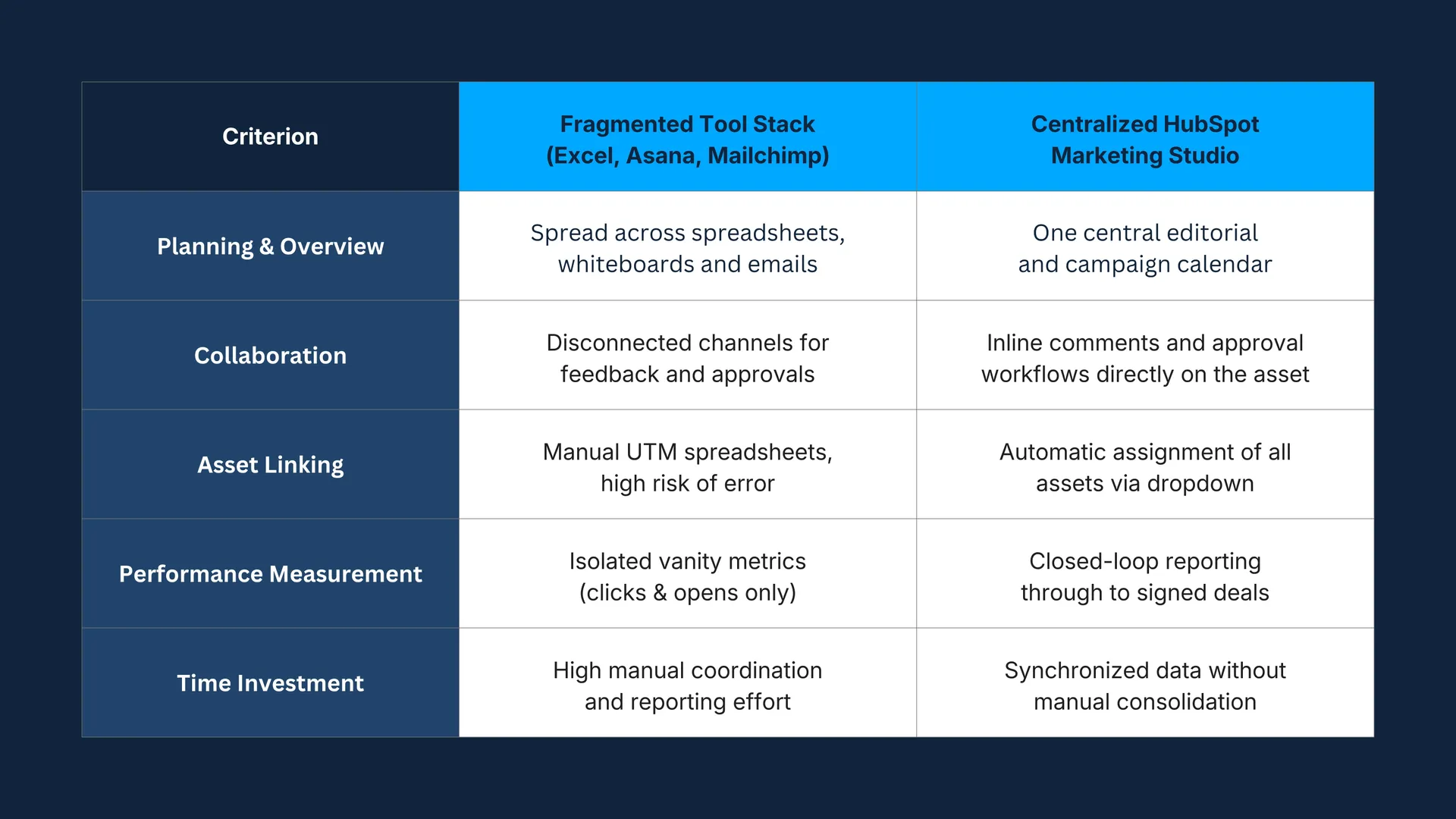
The Comparison: Fragmented Planning vs. HubSpot Campaign Studio
How does professional campaign planning work in HubSpot?
Structured campaign planning in HubSpot follows a five-step process, from defining goals to collaborative asset creation and automated reporting. This workflow ensures that content creation, technical delivery, and lead management work together seamlessly.
Create a Campaign, Set a Budget, and Define Goals
Before entering the first line of text, the strategic parameters are set in the tool:
- Campaign start and end dates.
- Planned budget (important for calculating ROI later).
- Specific metric targets (e.g., 250 new contacts, 40 marketing-qualified leads, €50,000 in influenced pipeline value).
Organizing and Creating Assets
Once the campaign is created, it serves as a folder and a central hub for all content. Landing pages, blog posts, and emails can be created directly from the campaign menu, or links to existing pages can be added. This prevents teams from overlooking important touchpoints.
Assign Tasks and Coordinate Deadlines in the Calendar
The integrated task management system clearly assigns responsibilities:
- Graphic designers receive the briefing directly on the landing page.
- Copywriters draft email drafts and tag colleagues for approval.
- All deadlines automatically sync with the overarching marketing calen
Launch the Platform and Automated Lead Paths
Once the platform goes live, the automated processes kick in: When a prospect fills out a form on the landing page, an automated workflow is triggered. This workflow sends confirmation emails, assigns lead scores, and notifies the sales team - all within the same data space.
Analyzing Multi-Touch Reporting and ROI
As soon as interactions occur, HubSpot collects the data in a clear, easy-to-read dashboard:
- Which blog posts attracted the most visitors?
- Which email generated the highest click-through rate?
- Which channel ultimately led to actual customer conversions (first-touch, last-touch, and multi-touch attribution)?
Why does multi-channel marketing often fail because of isolated, siloed solutions?
In practice, multi-channel marketing rarely fails due to a lack of creative ideas, but rather because of isolated data silos and a lack of attribution logic. When teams can’t determine which touchpoints actually contribute to revenue, budgets are allocated based on gut feeling rather than data.
The Silo Problem: Data Silos Prevent Learning
If social media runs on Platform A, emails are sent via Platform B, and the website is hosted on Platform C, there is no unified customer journey. A lead who first became aware of the company through LinkedIn, subscribed to the newsletter three weeks later, and requested a quote two weeks after that is treated as three separate events in isolated systems.
Closed-Loop Reporting as a Real Lever
The HubSpot Marketing Studio closes this loop (“Closed Loop”). Because the Marketing Hub is built directly on top of the central HubSpot CRM, the marketing team can see exactly when a website visitor became an opportunity contact and eventually a paying customer. This allows marketing expenses to be directly offset against the contribution margin generated.
Frequently Asked Questions (FAQ)
The full-featured Campaigns tool, including asset linking and detailed performance metrics, is available starting with the HubSpot Marketing Hub Professional. The Enterprise tier also offers advanced multi-touch revenue attribution models and more in-depth custom reports.
Yes. Through HubSpot’s granular role and permission system, external service providers or freelancers can be granted specific access to certain campaigns, assets, or calendar views without gaining access to sensitive customer data in the CRM.
For marketing-related campaign processes (editorial planning, asset creation, feedback loops), HubSpot’s built-in task management is often entirely sufficient. For complex, cross-departmental product development or IT sprints, however, it’s still recommended to integrate specialized tools via the HubSpot App Marketplace.
A successful campaign isn’t made up of ten disjointed individual activities, but rather a cohesive overall strategy with crystal-clear data feedback. By centralizing your campaign management in HubSpot, you not only save valuable time on team coordination but can also demonstrate to management in black and white at any time exactly how much revenue your marketing efforts are actually generating.
Would you like to structure your marketing processes or unlock the full potential of your HubSpot portal? At Schaller Digital, we support companies in the thorough design, technical setup, and operational use of HubSpot - in a practical, scalable way that’s aligned with your sales goals.